How to Read Binary Code: A Beginner's Guide
Binary looks unreadable, but it follows one simple rule. Once you know it, you can turn 01001000 01101001 into "Hi" with nothing but addition. This guide takes you from zero to reading binary text by hand.
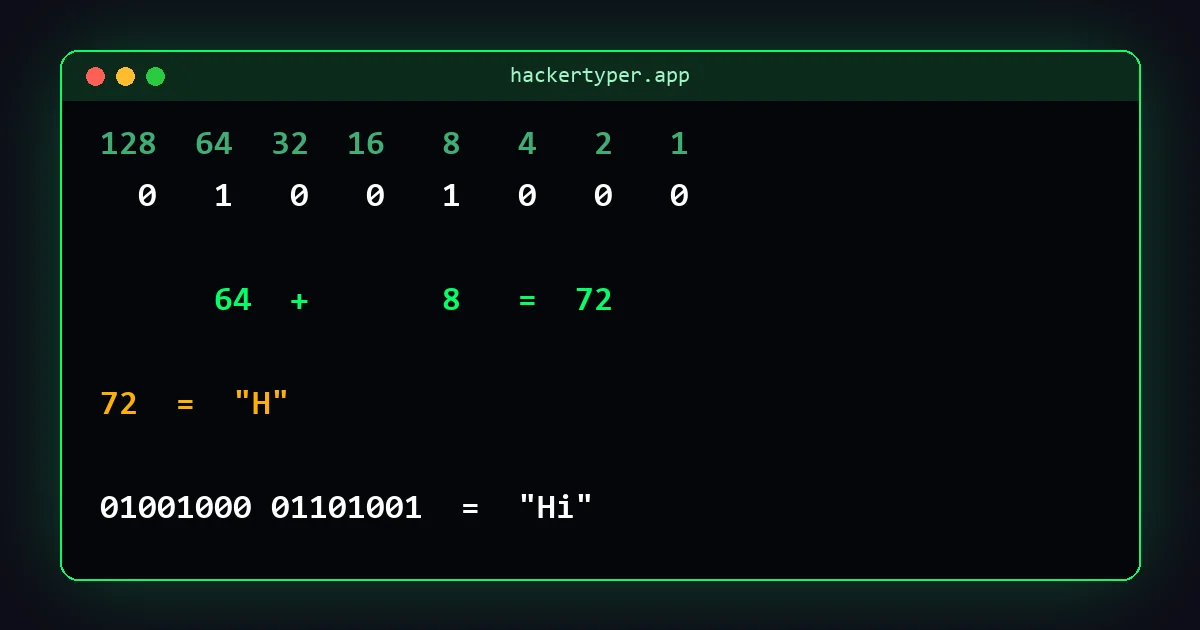
What binary is
The numbers we use every day are base 10. There are ten digits, 0 to 9, and each position is worth ten times the one to its right: ones, tens, hundreds.
Binary is base 2. There are only two digits, 0 and 1, and each position is worth twice the one to its right: ones, twos, fours, eights. Computers use it because a circuit has two easy states, off and on.
One binary digit is a bit. Eight bits make a byte, and text is normally written one byte per character.
Step 1: learn the place values
For an eight-bit byte the positions are worth, from left to right:
| 128 | 64 | 32 | 16 | 8 | 4 | 2 | 1 |
|---|
Each value is double the next. This row of eight numbers is the only thing you need to memorise.
Step 2: add up the positions that hold a 1
Write the byte under the place values. Wherever there is a 1, keep that value. Wherever there is a 0, ignore it. Add what is left.
Example: 01000001
| 128 | 64 | 32 | 16 | 8 | 4 | 2 | 1 |
|---|---|---|---|---|---|---|---|
| 0 | 1 | 0 | 0 | 0 | 0 | 0 | 1 |
There is a 1 under 64 and a 1 under 1. 64 + 1 = 65.
Another: 00101101 has ones under 32, 8, 4 and 1. 32 + 8 + 4 + 1 = 45.
Step 3: turn the number into a letter
Text uses a lookup table called ASCII that gives every character a number. You do not need the whole table. Three anchors cover the alphabet:
- Capital A is 65, B is 66, and so on up to Z at 90.
- Lower-case a is 97, b is 98, up to z at 122.
- A space is 32. The digits 0 to 9 are 48 to 57.
So the byte from step 2, 65, is the letter A.
The shortcut for reading letters fast
ASCII was designed with a pattern that makes letters easy to spot without adding up the whole byte. Split each byte into its first three bits and its last five.
- First three bits
010mean a capital letter. - First three bits
011mean a lower-case letter. - The last five bits give the letter's position in the alphabet: 00001 is the 1st letter, 00010 the 2nd, 00011 the 3rd.
For the last five bits the place values are just 16, 8, 4, 2, 1. Take 011 01000: lower-case, and 01000 is 8, so it is the 8th letter, h.
| Last five bits | Position | Letter | Last five bits | Position | Letter |
|---|---|---|---|---|---|
| 00001 | 1 | A | 01110 | 14 | N |
| 00010 | 2 | B | 01111 | 15 | O |
| 00011 | 3 | C | 10000 | 16 | P |
| 00100 | 4 | D | 10001 | 17 | Q |
| 00101 | 5 | E | 10010 | 18 | R |
| 00110 | 6 | F | 10011 | 19 | S |
| 00111 | 7 | G | 10100 | 20 | T |
| 01000 | 8 | H | 10101 | 21 | U |
| 01001 | 9 | I | 10110 | 22 | V |
| 01010 | 10 | J | 10111 | 23 | W |
| 01011 | 11 | K | 11000 | 24 | X |
| 01100 | 12 | L | 11001 | 25 | Y |
| 01101 | 13 | M | 11010 | 26 | Z |
Two more patterns are worth knowing. A byte starting 0011 is a digit, and its last four bits are the digit itself, so 0011 0111 is 7. And 00100000 is a space.
A full worked example
Decode 01001000 01100101 01101100 01101100 01101111.
| Byte | First three | Last five | Position | Letter |
|---|---|---|---|---|
| 01001000 | 010 (capital) | 01000 | 8 | H |
| 01100101 | 011 (lower) | 00101 | 5 | e |
| 01101100 | 011 (lower) | 01100 | 12 | l |
| 01101100 | 011 (lower) | 01100 | 12 | l |
| 01101111 | 011 (lower) | 01111 | 15 | o |
The message is Hello.
Writing a number in binary
To go the other way, work through the place values from the left. If the value fits into what remains of your number, write 1 and subtract it. If not, write 0.
Example: 77. Does 128 fit? No, 0. Does 64 fit? Yes, 1, leaving 13. 32? No. 16? No. 8? Yes, leaving 5. 4? Yes, leaving 1. 2? No. 1? Yes. Result: 01001101, which is the letter M.
Practice
Try these before looking at the answers.
01001111 0100101101100011 01101111 01100100 0110010100110100 00110010
Answers: 1 is "OK". 2 is "code". 3 is "42".
FAQ
How do you read binary code?
Give each of the eight positions the values 128, 64, 32, 16, 8, 4, 2 and 1 from left to right, add the values where there is a 1, then look up that number in the ASCII table to get the character.
What does 01001000 01101001 mean?
It means "Hi". 01001000 is 72, the code for capital H, and 01101001 is 105, the code for lower-case i.
Why are there eight digits in each group?
Eight bits make one byte, the standard unit computers use to store a character of basic text. Eight bits can represent 256 different values.
Is binary a language?
Not in the human sense. Binary is a number system. Text, images and programs are all stored as binary numbers, and standards such as ASCII and UTF-8 define which numbers stand for which characters.