Prank Links to Send to Friends: The Fake Hacker Link
The best prank links make your friend panic for twenty seconds and laugh for the next five minutes. This one shows a fake hack with their name in it, running on their own screen, then admits it was a joke. No downloads, nothing real, and it takes about thirty seconds to make.
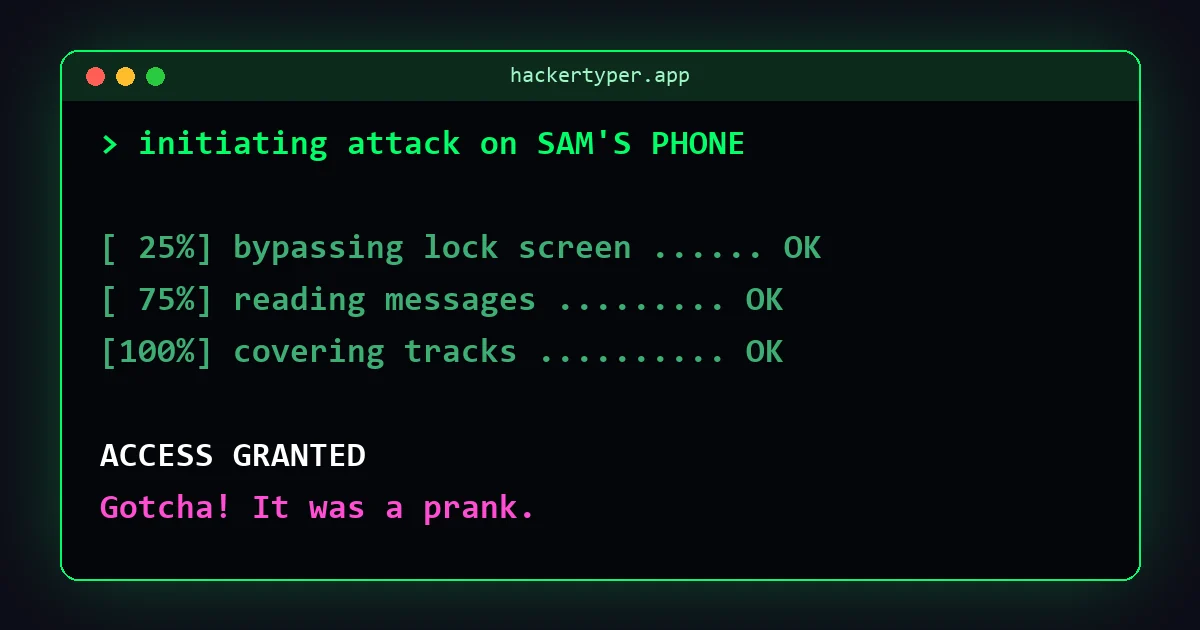
What your friend sees
- They tap your link and the page turns into a black terminal that fills the screen.
- Green text starts scrolling:
> initiating attack on Sam's phone. - Step by step it "bypasses the lock screen", "reads the contacts" and climbs to 100%, all with their name in it.
- A big ACCESS GRANTED appears.
- A few seconds later the screen says Gotcha!, explains that nothing was hacked, and offers to let them prank someone back.
The whole thing takes about twenty seconds. Nobody is left wondering whether it was real.
How to make the link
- Go to Hacker Typer Prank.
- In What are you "hacking"?, type something personal: Sam's phone, Mum's laptop, the group chat. Up to 40 characters.
- Pick a scenario. Each one has its own fake steps.
- Press Create share link.
- Press Copy link, WhatsApp or, on a phone, Share, and send it.
Which scenario to pick
| Scenario | What it "hacks" | Best for |
|---|---|---|
| Friend's phone | Lock screen, contacts, messages, then "too many embarrassing selfies" | Close friends. The silly ending makes it obvious fast |
| Wi-Fi network | Captures the handshake, tests passwords, connects | Housemates, family, the office Wi-Fi name |
| Secret mainframe | Firewalls, encryption, classified archives | Anyone who likes films; feels like a movie scene |
| Satellite | Aligns an antenna and "redirects the camera feed" | Over-the-top fun; nobody believes it for long |
Ideas that work well
- Their name plus their device: "Alex's iPhone" is far more convincing than a made-up target.
- The group chat: send it to a group with the target set to the group's name.
- Timing: send it with a short message like "is this you??" or "did you see this". Curiosity does the rest.
- The prank-back chain: when they reach "Gotcha!", they can make one for someone else in one tap. See how far it travels.
Sending it on WhatsApp, Discord and other apps
- WhatsApp: press the WhatsApp button and pick the chat. The link preview shows the Hacker Typer page, which looks harmless.
- iMessage, Messenger, Telegram, Instagram: use Copy link and paste it, or the Share button on a phone.
- Discord: paste the link in a server or direct message. It works the same on desktop and mobile.
The prank works on phones, tablets and computers in any modern browser.
Is it safe?
Yes. The link opens an ordinary web page that shows text. It does not install anything, does not access the phone, its contacts or its camera, and does not collect any information from the person who opens it.
The name you typed is stored in the link itself, after the # sign. That part of a web address is never sent to the server, and our analytics ignore it. Anyone who sees the link can read the name, so keep to first names and nicknames.
A word about other "prank links"
Many links shared as "pranks" are not harmless. Some lead to fake login pages that steal passwords, pages that try to install apps or browser extensions, or scary pop-ups that tell you to call a "support" number. A real prank link never asks the person to log in, download anything, allow notifications, or pay. If a link someone sends you does any of those, close it.
Keep it kind
- Send it to people who will laugh, not to someone who is anxious about security or already having a bad day.
- Do not send it to strangers, teachers, employers or anyone who might report it as a real attack.
- Never use it to scare someone into doing something. The reveal is part of the joke, and it is built in for that reason.
Want something to play in person instead? Try the fake update screen, the broken screen or the ideas in 15 harmless computer pranks.
FAQ
What is a good prank link to send to friends?
A link that surprises them for a moment and then reveals the joke. The Hacker Typer Prank link shows a fake hack with their name in it and ends with a Gotcha message, so it is funny without being harmful.
Does the prank link actually hack anything?
No. It only shows pre-written text on the screen of the person who opens it. Nothing is accessed, installed or collected.
Can my friend see that it is a prank?
Yes, at the end. After Access Granted, the screen shows Gotcha and explains that nothing was hacked.
Does it work on iPhone and Android?
Yes. It runs in any modern browser on phones, tablets and computers.
Is the name I type saved anywhere?
No. It is stored only inside the link after the # sign, which is not sent to the server and is excluded from analytics.